Quick Summary:
- What ChatGPT does well: It handles the language side of patent work, like explaining references, planning inventor interviews, checking claim text, and drafting client emails. It is not a patent database and can’t read USPTO file histories.
- Where it falls short: Alone, it gave different prior art lists each time, no patent counts, and unverified examiner figures. Anything tied to the patent record needs a patent data source.
- How to write a strong prompt: Use role, jurisdiction, technical facts, task, output format, and proof. Name a specific record (like an application number) instead of a topic.
- 12 prompts across 4 stages: Each is labeled “ChatGPT alone” or “needs IP Author,” so you know which tasks need patent data.
- Before drafting: Find the closest prior art and gaps, study weaknesses in published claims, and review a similar patent’s file history.
- While drafting: Build an embodiment checklist, check antecedent basis and § 112(b) issues, and prepare inventor interview questions.
- After filing: Map rejections to claim limitations, weigh Office Action response options, write client update emails, and compare examiner patterns.
- Checking products against patents: Build evidence of use charts and run a preliminary freedom to operate screen. Both are research aids, not legal conclusions.
- Security and trust: IP Author is SOC 2 Type II and ISO 27001:2022 certified and never trains on your content. Ask for records by number so no client text is pasted.
- Why the source matters: In Mata v. Avianca (2023), lawyers were fined $5,000 for citing cases ChatGPT invented. Record-based answers can be traced and verified.
- Bottom line: Use ChatGPT for language work, a patent data source for record-dependent tasks, and always verify key citations before sending anything to a client or the USPTO.
ChatGPT is good at the language side of patent work: explaining references, planning inventor interviews, checking claim text and writing client emails. It is not a patent database. On its own it searches the open web and cannot read USPTO file histories, so anything that depends on the patent record needs a patent data source.
This guide gives you 12 prompts across the patent lifecycle and says which ones need patent data.
Did you know? Obviousness is the rejection patent attorneys meet most often. In the USPTO’s research dataset of about 4.4 million Office actions mailed from 2008 to mid-2017, roughly 79 percent included a Section 103 rejection, compared with about 42 percent for lack of novelty. Source: USPTO Office of the Chief Economist, Office Action Research Dataset paper
What ChatGPT can and cannot do
In IP Author’s side-by-side tests, plain ChatGPT returned a different prior art list each time the same question was asked, could not give a patent count, and marked its own examiner figures as unverified. Connecting patent data changes that.
| Task | ChatGPT on its own | With IP Author connected |
|---|---|---|
| Explain a published claim | Strong | Same, with the text pulled from the record |
| Prior art search | Open web results, no filters | Searches millions of publications and ranks the closest references |
| Patent counts in a field | Could not give a number | Exact count with top filers and trends |
| Prosecution history | Public dates and issued claims only | Each rejection, amendment and argument |
| Examiner statistics | Figures marked unverified | Allowance rates and rejection patterns |
| Drafting an application | Not advised for unfiled inventions | Done in the IP Author platform |
How to write a good patent prompt
Use this pattern: role, jurisdiction, technical facts, task, output format, and proof.
Act as a US patent attorney. Technical facts: [non-confidential summary, or an application or patent number]. Task: [what you want done]. Output: [table, list or 200-word email]. Mark anything you assumed, and give the reference numbers, dates and claim numbers you rely on.
Name a record, not a topic: “Summarize US application 17/309,329” gets a file-history answer, while “tell me about foldable phone patents” gets a web summary. When you need patent records, start with “Using IP Author,” so ChatGPT uses IP Author instead of the open web.
12 prompts for each stage of the patent lifecycle
Stage 1: Before you draft
Prompt 1: Closest prior art and the gaps (needs IP Author)
Using IP Author, find the closest prior art for [short description of the technical concept]. For each reference, say what it discloses and what it does not. Then list the features that none of the references disclose.
IP Author first sets out the features it will search for and asks you to approve that scope. It then returns ranked references with similarity scores. In our test it screened 2,576 results and ranked 44 references. Describe the concept at the level of a public abstract; for a search based on the full disclosure, use prior art search in the platform.
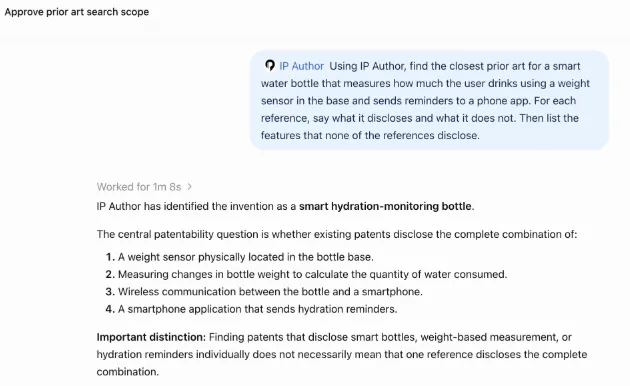
Prompt 1 in ChatGPT: IP Author defines the search scope and waits for approval.
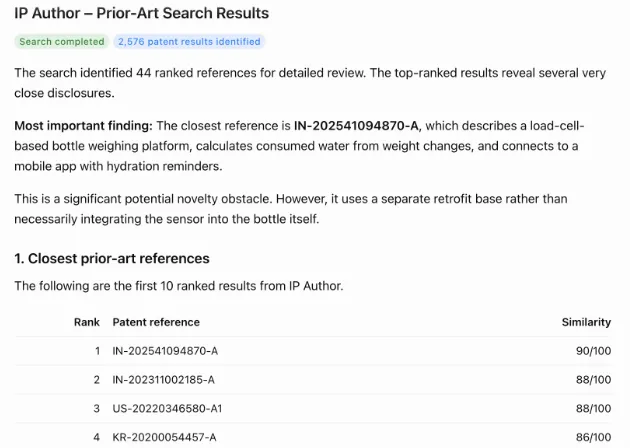
The ranked results, with a similarity score for each reference.
Prompt 2: Learn from published claims in your field (ChatGPT alone)
Act as a US patent attorney. Below are the independent claims of a published patent in my technology area. Explain what each claim protects, where a competitor could design around it, and which limitations look narrower than they need to be. Flag any § 101 or § 112(b) risks. Claims: [published claims].
You see where published claims in your field are weak, which helps you set the breadth of your own claim 1. The claims are public, so nothing confidential goes into the chat.
Prompt 3: A similar patent’s file history (needs IP Author)
Using IP Author, give me a chronological prosecution history of US application [number] as a table: each Office Action and its date, each rejection and its statute, the references and passages cited, claim amendments, the applicant’s arguments and the examiner’s response. Keep what the record says separate from your interpretation, and do not say an argument caused allowance unless the record shows it.
See what it took to get a similar patent allowed before you write your own dependent claims.
Stage 2: While you prepare the draft
Prompt 4: Embodiment checklist for your field (ChatGPT alone)
I am preparing a patent application for a [general type of device or method]. Without assuming anything about my invention, list the alternative materials, parameter ranges, components and design variations that applications in this field usually describe, so I can check my draft for gaps.
Nothing about the invention goes into the chat. Treat each item as a question for the inventor, not a fact about the invention.
Prompt 5: Antecedent basis and § 112(b) check (ChatGPT alone)
Check this claim set for antecedent basis problems and indefinite terms. List every “the” or “said” term, where it is first introduced, and any term that is introduced twice, never introduced or relative without a standard. Claims: [anonymized claims].
Replace names and part numbers with placeholders first, or run the check in your drafting platform.
Prompt 6: Inventor interview questions (ChatGPT alone)
I am interviewing an inventor about a [type of device]. Write 15 questions that uncover alternative embodiments, failure modes, materials and measurable technical advantages. Do not assume any details about the invention.
More embodiments from the interview mean more support for the claims you want later.
Stage 3: After filing
Prompt 7: Map a rejection to claim limitations (needs IP Author)
Using IP Author, map each limitation of claim [number] in application [number] to the passage the examiner relies on, with the Office Action paragraph and the column and line or paragraph of the reference. Say whether each rejection rests on one reference or a combination, and whether the reason to combine is stated. Keep what the examiner stated separate from your own inferences.
A good output looks like this:
| Claim limitation | Examiner’s position | What to check |
|---|---|---|
| A sensor configured to detect X | Reference A, paragraph 42 (Office Action, paragraph 6) | Whether paragraph 42 shows the claimed configuration |
| A controller configured to adjust Y based on X | Reference B, paragraph 18, combined with A “to improve efficiency” | Whether B adjusts Y in response to X, and whether the reason to combine fits |
Illustrative example, not a real prosecution record.
The second row is where the response starts: if Reference B adjusts Y for a different reason, the combination rationale becomes your argument.
Prompt 8: Office Action response options (needs IP Author)
Using IP Author, analyze the latest Office Action for application [number] rejection by rejection. For each, give the statutory basis, the arguments available, amendment options and how each would narrow claim scope, the specification passages that would support an amendment, and any estoppel risk. Confirm the response deadline from the official record.
If the application is unpublished, its Office Action is not public, so keep it out of general chats. For full first-pass responses, see Office Action response.
Prompt 9: Client update email (ChatGPT alone)
Turn the prosecution update below into a plain-language email for a non-lawyer R&D executive: current position, recommended next steps, deadlines and trade-offs, under 200 words, ending with the decision I need. Update: [anonymized update].
Check the deadlines before it goes out. Your name is on it.
Prompt 10: Examiner patterns (needs IP Author)
Using IP Author, compare examiners [name] and [name]: allowance rate, how often they issue § 103 rejections, and allowance rates with and without an interview, with the time period and number of applications behind each figure.
Read interview figures as a pattern, not proof that the interview caused the outcome. For free examiner data, try Prosecution Insights.
Try Prompts 7, 8 and 10 on a real file. Start a 14-day free trial and run them on one of your own published applications.
Stage 4: Checking products against patents
Prompt 11: Evidence of use chart (needs IP Author)
Using IP Author, build an evidence of use chart for US patent [number] against [product name] from [company]. Map each limitation of the independent claims to public product evidence and quote the source for each point. Check prosecution history estoppel and any equivalents issues, list where evidence is missing, and do not give an infringement conclusion.
IP Author finds and ranks the product evidence itself, reads the file history for estoppel, compares the patent drawings with product images and runs a second, cautious review. It pauses for your approval at each step, and the chart downloads as Word, Excel or PDF. If you only have the patent number, it can suggest which products the claims may read on. The infringement call stays with you.
Prompt 12: Freedom to operate screen (needs IP Author)
Using IP Author, run a preliminary US freedom to operate screen for [product]. Check legal status, include pending applications and continuations, rank the patents that could be a risk, read the closest ones claim by claim, and list the checks still open.
You get a claim-by-claim report you can download. It is a research aid, not a clearance opinion.
How IP Author protects your work
IP Author is SOC 2 Type II compliant and ISO 27001:2022 certified, and your content is never used to train its models. Ask for records by application or patent number, and IP Author pulls them from the source, so no client text gets pasted into the chat. The chat itself still follows your ChatGPT plan’s terms. Details are in the Trust Center.
Why the source of the answer matters
In Mata v. Avianca (2023), two lawyers and their firm were fined $5,000 for citing cases ChatGPT invented. General AI tools answer from memory and the open web, so in patent work the risk is a reference number that does not exist or an amendment that is not in the file wrapper.
IP Author works from the record instead. It answers from its patent corpus and USPTO file histories, cites the patent numbers, passages and Office Action details it relied on, and its analysis tools add a second, cautious review pass. Every point traces back to a source you can open and check. You still sign the filing, so check the key citations before anything goes to a client or the USPTO.
The bottom line
Use ChatGPT for language work, connect a patent data source for anything that depends on the record, and keep confidential material in approved tools. The claims and specification themselves belong in a drafting platform; see patent drafting with IP Author or our roundup of the best AI tools for patent drafting.
New to IP Author? Start a 14-day free trial and run these prompts on your own matters. Prefer Claude? IP Author works there too.